Free · Private · No upload
Photo editing, free in your browser
A layered image editor with the tools you already know — running entirely on your device. No upload, no account, no watermark.
Runs in your browser — a free, web-based alternative to Adobe Photoshop.
No upload
Files are processed on your device
No sign-up
No accounts, no email, no paywall
No limits
Any file size, any batch size
Metadata stripped
EXIF & GPS removed on export
Photoshop-style photo editor that runs entirely in your browser. Layers, blend modes, filters, selections and retouching, powered by a native-speed core. No upload, no sign-up, free.
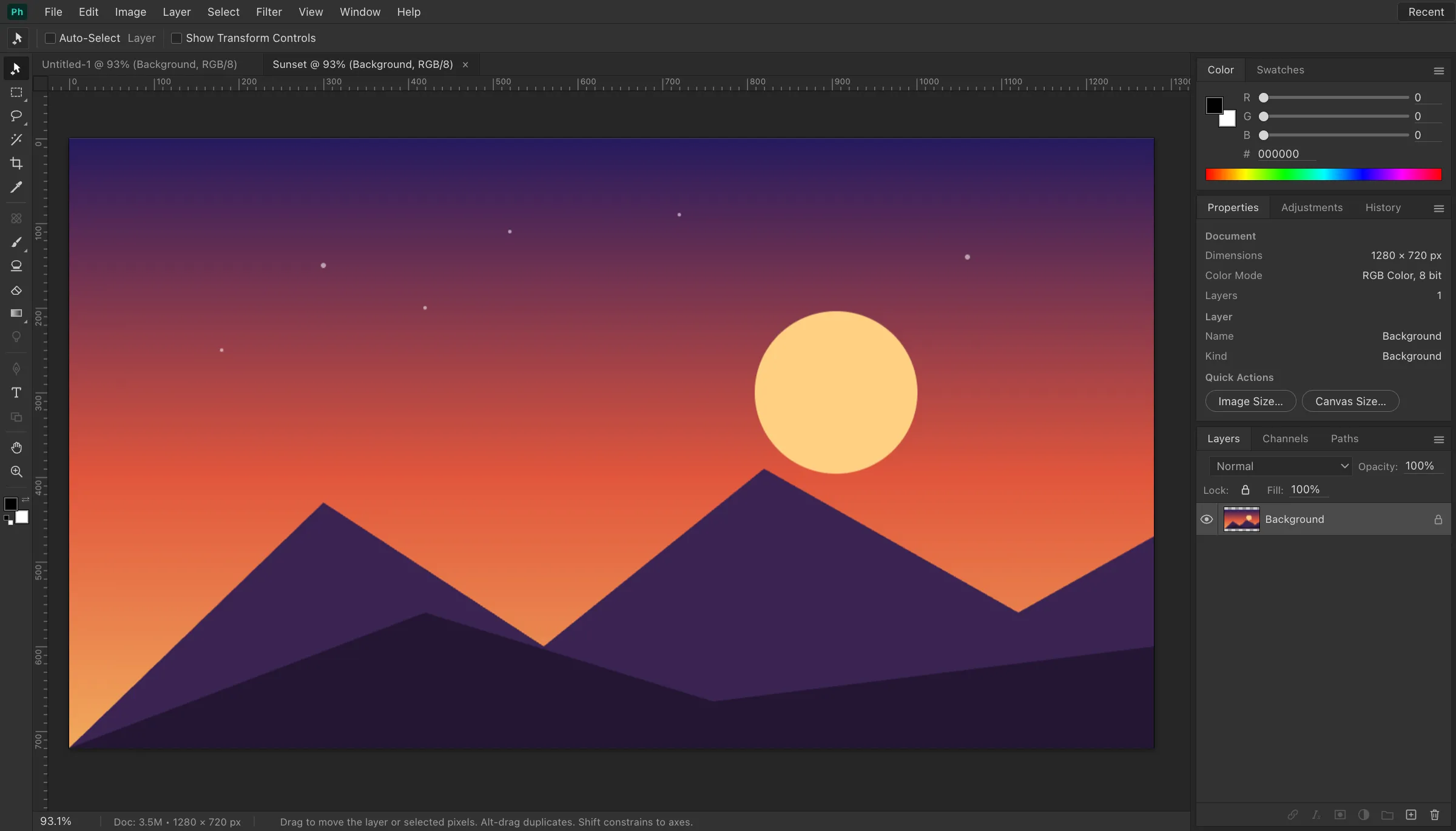
Everything you need, nothing to install
How it works
The editor is a full application compiled to run in your browser. When you open it, your browser downloads the editor and its processing core once, caches them, and from then on every operation — opening files, editing, exporting — happens on your own device. Nothing you work on is uploaded, which is also why there are no accounts, queues or file-size pricing tiers.
Curious about the details? Read how EditItAll works, or just open the editor — it loads in seconds.
What we actually shipped
This is a layered raster workspace compiled to WebAssembly, not a one-click beautify widget. I open JPEGs from a phone, duplicate the background, and retouch with clone stamp plus healing-style sampling. Blend modes follow the Photoshop set — multiply, overlay, color dodge, luminosity — so a composite looks familiar if you already think in layers. Selections are marquee, lasso and magic wand with feathering: enough to isolate a sky or a product shot, not a semantic cutout model.
The screenshot above is the real chrome: toolbox on the left, options bar, layers dock, pasteboard around the canvas. Brushes, gradients, paint bucket, eraser, levels, curves, hue/saturation and color balance live where a desktop editor puts them. Gaussian blur and unsharp mask sit with the rest of the filter stack. Undo is per tab, in RAM, on your machine.
What this is not
It is not a Lightroom catalog: there is no library, no tethered capture, no Develop module for camera RAW, and no smart collections. It is not a print RIP and it will not convert to CMYK, spot colors, or ICC-aware press output. There is no generative fill, no neural filters, no cloud sync, and no plugin host. PSD files with layer stacks should go through Image Tools first if the browser cannot decode them; this canvas will not silently drop a layer group.
It is also not a phone app pretending to be Photoshop. The empty state on a small screen is built so you can still open a file; the full rails are a desktop layout. If you need a catalog, tethered shooting, or a print pipeline, keep the desktop suite. If you need layers in a browser tab without an account, this is the job.
Limits we hit in real files
Browser memory is the ceiling. A 200-megapixel TIFF can fail on a low-end laptop, and a phone will choke sooner. HEIC from iPhones is readable only after conversion. Animated GIF and WebP open as a still frame. Exports are PNG or JPEG — no WebP write from this editor, no 16-bit TIFF, no layered PSD round-trip. Closing the tab without exporting is how you lose work. That is the trade for never uploading the pixels.
A typical retouch session: drop a portrait, zoom with the scroll wheel, duplicate the layer, clone out a sensor spot, pull a gentle S-curve, mask the adjustment toward the face, sharpen with unsharp mask, then export PNG for a transparent cutout or JPEG for email. Everything stays in the tab. If the file is HEIC, RAW, TIFF or PSD the decoder cannot swallow, convert it in Image Tools and come back — we would rather refuse than pretend a failed open succeeded.
What is actually on the menus
Tools: Move, Crop, Eyedropper, Horizontal Type, Hand, Zoom, Lasso, Polygonal Lasso, Magic Wand, Brush, Pencil, Eraser, Clone Stamp, Gradient, Paint Bucket. Adjustments: Brightness/Contrast, Levels, Curves, Exposure, Vibrance, Hue/Saturation, Color Balance, Black & White, Invert, Posterize, Threshold, Desaturate, Auto Tone. Image: Image Size, Canvas Size, rotate 90/180, flip horizontal or vertical, crop to selection, duplicate document.
Layer ops: New Layer, Layer Via Copy, Duplicate Layer, Delete Layer, Rasterize Type, Background From Layer, Bring to Front, Bring Forward, Send Backward, Send to Back, Merge Down, Merge Visible, Flatten Image. Select: All, Deselect, Reselect, Inverse, Border, Smooth, Expand, Contract, Feather. Filters: Gaussian Blur, Box Blur, Motion Blur, Add Noise, Median, Mosaic, Clouds, Sharpen, Sharpen More, Unsharp Mask, Emboss, Find Edges, Solarize.
Blend modes, in Photoshop menu order: Normal, Dissolve, Darken, Multiply, Color Burn, Linear Burn, Darker Color, Lighten, Screen, Color Dodge, Linear Dodge (Add), Lighter Color, Overlay, Soft Light, Hard Light, Vivid Light, Linear Light, Pin Light, Hard Mix, Difference, Exclusion, Subtract, Divide, Hue, Saturation, Color, Luminosity. Opacity and fill are per layer. That is the inventory — not a teaser.
Photoshop features we do not pretend to have
Missing on purpose, because shipping a fake version would be worse than saying no: Camera Raw / ACR develop, Adobe Bridge, Lightroom catalogs, tethered capture, smart objects, smart filters, layer comps, layer styles (drop shadow, inner shadow, inner glow, outer glow, satin, stroke, color overlay, gradient overlay, pattern overlay, blending options, knockout), channels panel, spot channels, duotone / tritone / quadtone, indexed color, bitmap mode, Lab, CMYK, 16-bit and 32-bit HDR, Merge to HDR, Photomerge panoramas.
Also absent: content-aware fill, content-aware scale, puppet warp, Liquify, Vanishing Point, 3D materials, video timelines, frame animation, Actions, droplets, Batch, Image Processor, JSX / ExtendScript, UXP and CEP plugins, Generator, Creative Cloud libraries, cloud documents, Adobe Fonts, artboards, the Frame tool, Select Subject / Select Sky / Object Selection, Select and Mask, Refine Edge, Neural Filters, Sky Replacement, Hair, decontaminate colors. If your job needs those, Photoshop is the honest pick. If your job is layers, clone, curves and a PNG in a tab, stay here.
How this sits next to other editors
Photopea is still the most complete in-browser Photoshop clone; treat it as the power baseline, and note that some of its features talk to a server. Pixlr E is lighter and nudges you toward an account. Photopea and Pixlr both chase feature parity harder than we do. Affinity Photo is a paid desktop app with CMYK, LAB, and a genuine print story. GIMP is free, local, and a different muscle memory. Krita is painting-first with a brush engine we do not try to match. Paint.NET stays Windows-only. Canva, Adobe Express, Fotor, BeFunky and PhotoScape are template and one-click polish tools. Snapseed, VSCO and Polarr are phone-shaped. SumoPaint is flash-era muscle memory. We occupy the privacy-shaped slice: Photoshop-style layers in a tab, WebAssembly on the device, no login.
Shortcuts that actually fire: V move, M marquee, L lasso, W wand, C crop, B brush, E eraser, S clone, G gradient, I eyedropper, T type, H hand, Z zoom, space-pan, Cmd/Ctrl+Z undo, Shift+Cmd/Ctrl+Z redo, Cmd/Ctrl+C/V/X clipboard, Cmd/Ctrl+A select all, Cmd/Ctrl+D deselect, Cmd/Ctrl+J layer via copy, Cmd/Ctrl+E merge down, Cmd/Ctrl+L levels, Cmd/Ctrl+M curves, Cmd/Ctrl+U hue/saturation, Cmd/Ctrl+B color balance, Cmd/Ctrl+I invert, Cmd/Ctrl+F last filter, Cmd/Ctrl+0 fit on screen, Cmd/Ctrl+plus/minus zoom, [ and ] brush size, Shift+F6 feather. Bracket those against Photoshop muscle memory; they are the subset we honor, not a promise of every Adobe binding.
Runtime notes, because people ask: pixels live in ArrayBuffers behind a WASM core, not a hidden upload. The tab may use IndexedDB or localStorage for recents and in-progress documents — still on-device. A service worker caches the editor shell so a second visit is faster; that is HTTP caching, not telemetry. OffscreenCanvas and ImageBitmap help decode. We do not require SharedArrayBuffer, WebGPU, or a WebGL context to retouch a JPEG. Clipboard paste of a bitmap works in Chromium; Safari is pickier. Drag-and-drop onto the pasteboard is the happy path. MIME sniffing will not magically open a .psd.live or a camera RAW until Image Tools has developed it.
Color and resampling, said plainly: we composite in the tab’s bitmap, typically 8-bit sRGB. There is no Display P3 pipeline, no Adobe RGB working space, no untagged-to-tagged conversion you can inspect, no histogram panel, no clipping warnings, no split toning, no luminance-versus-chrominance noise sliders, no Bayer demosaic, no white-balance temperature/tint, no gamut mapping intents (perceptual, relative colorimetric, saturation, absolute). Resize uses the editor’s interpolation — not a named bicubic-smoother / bicubic-sharper / nearest-neighbor / Lanczos picker like a RIP. Banding on gradients is a real 8-bit artifact; dither is not a checkbox. Moire and aliasing on downscales happen. Treat this as a retoucher, not a color-managed press pass.
Formats at the door: PNG, JPEG/JPG, WebP, GIF (first frame), BMP, AVIF as a bitmap if the browser decodes it, SVG rasterized on open. Not written: WebP, AVIF, JPEG XL, QOI, HEIC, TIFF, PSD, PSB, OpenEXR, TGA, ICO, PDF from this editor. Camera RAW families (CR2, CR3, NEF, ARW, DNG, ORF, RW2, RAF, PEF) belong in Image Tools’ developer, not here. That split is deliberate so a failed decode is visible instead of a blank canvas.
Leave this tab for Capture One, DxO PhotoLab, Darktable or RawTherapee when you are developing RAW. Pixelmator Pro, Photomator and Acorn if you want a Mac-native layered app. IrfanView, XnView and FastStone for a Windows thumbnail browser. GraphicConverter for batch metadata. Photos.app, Preview, and Windows Photos for the OS viewer. Luminar and ON1 for catalog-plus-AI. Nik Collection, Topaz DeNoise, Helicon Focus, Zerene Stacker, PTGui and Hugin are specialist plug-ins or stitchers — also not this tab. We are none of those, on purpose.
Guides · Adobe Photoshop alternative
Frequently asked questions
Is the photo editor free?+
Yes — completely free. No account, no sign-up, no watermark and no usage limits. Open the editor and start working.
Are my photos uploaded to a server?+
No. All editing runs locally in your browser through a native-speed image-processing core. Your photos never leave your device, and exports are generated on your machine.
Is this a Photoshop alternative?+
It is a browser-based editor with a familiar Photoshop-style workflow: layers with blend modes, brush and clone tools, marquee/lasso/magic-wand selections, adjustment dialogs like levels and curves, and a large filter set. It is an independent product and is not affiliated with or endorsed by Adobe.
Which file formats can I open and export?+
You can open PNG, JPG, WebP, GIF, BMP, AVIF and SVG (as a bitmap). PSD, TIFF, HEIC and camera RAW should be converted in Image Tools first if the browser cannot decode them — the editor will not silently skip a failed file. Export is PNG or JPG.
Which browsers are supported?+
Any modern desktop browser: Chrome, Edge, Firefox, Safari and other Chromium-based browsers. A desktop-class screen is recommended.