Free · Private · No upload
PDF viewing & editing, free in your browser
An Acrobat-style editor for documents that never leave your device — high-fidelity rendering plus a native-speed page-processing core.
Runs in your browser — a free, web-based alternative to Adobe Acrobat.
No upload
Files are processed on your device
No sign-up
No accounts, no email, no paywall
No limits
Any file size, any batch size
Metadata stripped
EXIF & GPS removed on export
Acrobat-style PDF viewer and editor that runs entirely in your browser. View and search documents, reorder, rotate, extract and merge pages, annotate with highlights, shapes, ink and notes, then export a real PDF — powered by a high-fidelity rendering engine and a native-speed core. No upload, no sign-up.
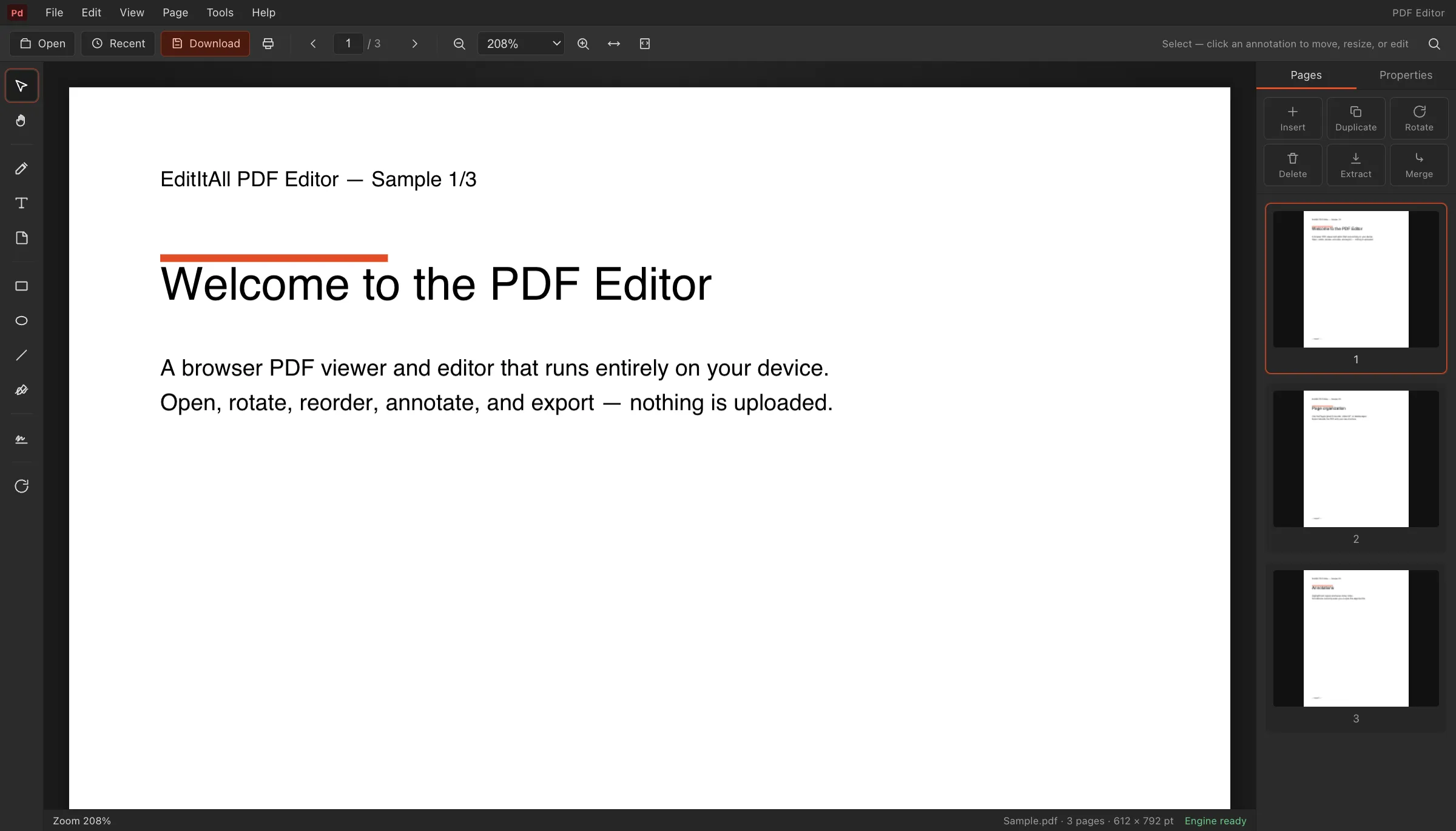
Everything you need, nothing to install
Do one thing fast
How it works
The editor is a full application compiled to run in your browser. When you open it, your browser downloads the editor and its processing core once, caches them, and from then on every operation — opening files, editing, exporting — happens on your own device. Nothing you work on is uploaded, which is also why there are no accounts, queues or file-size pricing tiers.
Curious about the details? Read how EditItAll works, or just open the editor — it loads in seconds.
What we actually shipped
The PDF editor is a viewer, a page surgeon, and an annotation layer in one tab. A high-fidelity renderer paints glyphs and images; a native-speed core rebuilds the file when you rotate, reorder, extract, delete or merge pages. Highlights, sticky notes, free text, ink and shapes write as real PDF objects with appearance streams, so Acrobat, Preview and other viewers show them — and they round-trip if you open the export here again.
Fill & sign can stamp a drawn, typed or image signature. Print uses the browser dialog, entirely client-side. The screenshot is the live chrome: thumbnails, page tools, annotation dock. Task landers for merge, sign and rotate host those jobs on the page so you do not have to enter the full editor for a one-shot fix. The empty state no longer auto-opens Sample.pdf; open your own file or create a blank.
What this is not
Not Adobe Acrobat Pro. There is no OCR of scanned pages, no XFA or live AcroForm calculation scripts, no certificate-based digital signatures, no DRM or permissions editor, no PDF portfolios, no prepress imposition, no JavaScript inside the document, no Bates numbering, and no redaction tool that punches the underlying text stream out for a legal hold. If you need those, keep Acrobat.
If you need to merge an appendix, rotate a sideways scan, highlight a clause, place a signature and download — without an account and without the file leaving the laptop — this is the job. The full toolbar is a desktop layout; on a phone the empty state is sized so Open still works, then the rails give the canvas room.
Limits we hit in real documents
The whole document sits in memory. Hundreds of pages usually work; a scanned 800-page construction set may not. Password-encrypted files the browser cannot unlock stay closed. Fonts that were never embedded may substitute. We do not linearize for fast web view. Browser memory, not a page cap, is the ceiling — same honesty as the rest of the suite.
A typical contract pass: open the PDF, rotate page two, delete a blank, merge an appendix from a second file, highlight a clause, place a signature, export. Nothing crossed the network. If the job is only merge, sign or rotate, use those landers; they are the same engines with less chrome. Guides under editing-PDFs cover the why; the tool URLs do the work.
What is actually on the menus
Viewing: multi-page canvas, zoom, fit, thumbnails, text search, find-next. Organize: rotate 90/180, reorder by drag, duplicate, extract, delete, merge pages from another file. Annotate: highlight, free text, sticky notes, square, circle, line, ink/pencil, image stamps. Fill & sign: draw, type, or place a PNG of a wet-ink signature. Output: export a rebuilt PDF, print through the browser, no watermark.
The merge, sign and rotate landers are the same page-processing core with a file input on the page — they exist because “merge PDF” and “sign PDF” are do-task queries, not reading queries. Open the full editor when you need thumbnails plus annotations plus organize in one sitting.
Acrobat features we do not pretend to have
We do not OCR scanned pages into a searchable text layer (no Tesseract pass, no hidden text stream). We do not emit PDF/A, PDF/X, PDF/UA or PDF/VT, tagged structure trees, role maps, output intents, or embedded ICC profiles. No trapping, overprint preview, transparency flattening, hairline fixes, imposition, printer marks, bleed, slug, trim box, art box, bleed box, or media-box surgery as a prepress tool.
Forms: no XFA, no live AcroForm calculations or validations, no submit-to-URL, no FDF/XFDF round-trip. Signatures: drawn/typed appearance only — not PKCS, not PAdES, not timestamps, not DSS/LTV certificates. No DRM, owner-password permissions editor, printing-allowed / copying-allowed bits, portfolios, collections, embedded-file attachments, 3D (U3D/PRC), rich media, Flash, geospatial, measurement tools, Bates numbering, running headers/footers, watermarks as optional content, Distiller/PostScript ingest, preflight, GWG checks, or veraPDF profiles. Acrobat Pro is the honest product for those jobs. This editor is the honest product for view–organize–annotate–export on your device.
How this sits next to other PDF tools
iLovePDF, Smallpdf, Sejda, ILovePDF clones, PDF2Go and similar “upload then download” suites win on OCR, compress, and office-to-PDF because they run a farm. That is also why they see the file. PDFescape and DocHub are form and comment tools with accounts. HelloSign / Dropbox Sign, DocuSign and PandaDoc are certificate signing and envelope workflows. Foxit, PDF-XChange and Preview.app are installed viewers. Adobe Acrobat online is the brand default and still an upload. We are the opposite architecture: pdf.js-class rendering plus a local rebuild, no envelope, no OCR, no farm.
Object model, in the terms people search: pages, content streams, FlateDecode, DCTDecode (JPEG), JPX, JBIG2 we may or may not round-trip depending on the parser, xref tables, trailers, object numbers, generation numbers, appearance streams for markup, /Annot, /Highlight, /Ink, /FreeText, /Stamp, /Widget only insofar as a signature image is a stamp, not a /Sig PKCS blob. We do not rewrite the name dictionary, the outline (bookmarks) tree, article threads, optional content groups, or the AcroForm dictionary as a forms designer. If a feature is not in the menus above, assume it is absent rather than hidden.
Keyboard and pointer: plus/minus or the zoom control, page-up/page-down or the page box, drag to pan, click a thumbnail to jump, drag thumbnails to reorder, delete to drop a page, common annotate shortcuts from the toolbar (highlight, note, ink). Escape cancels a tool. There is no Vim mode, no command palette, no JavaScript console inside the PDF. Recents on the empty state are local. Sample.pdf is no longer auto-loaded so a sign-pdf hop does not dump you into a demo document. WASM boots once; after that, organize and annotate should feel like a desktop viewer that happens to live at a URL.
Internals we will name so the page is not a brochure: a PDF is a graph of objects — catalog /Root, /Pages kids, /Page nodes, /Contents streams, /Resources (Font, XObject, ExtGState, ColorSpace, Pattern, Shading), xref or xref-stream, trailer, startxref, %%EOF, optional /Encrypt, /Info, /ID, /Metadata (XMP). Filters you will meet: FlateDecode, DCTDecode, JPXDecode, sometimes JBIG2Decode, CCITTFaxDecode, RunLengthDecode, ASCII85Decode. Boxes: MediaBox, CropBox, BleedBox, TrimBox, ArtBox, /Rotate. Annotations live in /Annots with subtypes /Highlight, /Underline, /StrikeOut, /Ink, /FreeText, /Text, /Stamp, /Square, /Circle, /Widget. We rebuild pages and write appearance streams for markup we created. We do not retarget named destinations, the /Outlines bookmark tree, article threads, optional content groups, the name dictionary, or /AA additional actions. If those terms are the job, you want a PDF SDK or Acrobat, not this tab.
Standards and operators, for the people who search them: ISO 32000 is the file format; ISO 19005 is PDF/A; we claim neither conformance. Incremental updates, object streams, hybrid xref, linearized hint tables, /Thumb, /PieceInfo, /MarkInfo, /Lang, /ViewerPreferences, /PageLayout, /PageMode, /OpenAction, /URI, /GoTo, /GoToR, /Launch, /Sound, /Movie, /Screen, /PrinterMark, /TrapNet, /Watermark, /Redact, /RichMedia, /FileAttachment, /Caret, /Polygon, /PolyLine, /Line, /Popup, /Link — if it is not a menu item, it is not implemented. Content-stream opcodes we do not expose as a drawing API: BT, ET, Tj, TJ, Td, TD, Tm, T*, cm, Do, gs, cs, CS, scn, SCN, rg, RG, k, K, w, J, j, M, d, ri, q, Q. Type0, Type1, TrueType, CIDFont, CMap, ToUnicode, Widths, FontDescriptor, embedded subsets: we render what the viewer can; we are not a font editor. That is the map. Use it to decide, then open a file or pick merge / sign / rotate.
Other viewers, so the comparison is named: Chrome, Edge and Safari already display PDFs; they do not reorganize or stamp. macOS Preview markup is fine for a scribble. SumatraPDF, MuPDF, Okular and Evince are fast local readers. Nitro, Wondershare PDFelement, Soda PDF, Able2Extract, CutePDF and PrimoPDF are installers or printers. Use those when you want a desktop binary. Use this URL when the document should never leave the machine and the job is view, annotate, merge, rotate, sign, export.
Libraries and CLI cousins, named so we do not hide the stack: pdf.js renders, pdf-lib and a native core rewrite pages, qpdf and pdftk and Ghostscript and Poppler and pdfcpu and mutool and cpdf and PyPDF and iText and PDFBox and PDFKit are the usual server-side toolkit — we do not shell out to them. PDF24, Icecream PDF, LightPDF, Hipdf, PDFsam, Master PDF Editor and PDF Studio are other GUIs. Pick them if you want a binary; pick this page if the bytes should stay in the tab.
Compression and fonts you might be hunting: we do not recompress with JBIG2, JPEG2000, or MRC mixed-raster. We do not subset or embed OpenType, WOFF, or Type3. We do not linearize, object-stream, or discard unused objects as an optimizer. We do not decrypt with a user password beyond what the viewer already unlocked, and we do not set an owner password. Bookmarks, destinations, JavaScript /JS, /OpenAction, presentations, transitions, page-duration, collections, associated files (AF), PDF 2.0 namespaces — out of scope. The export is a page tree plus the annotations we drew. That is enough for a contract markup; it is not a prepress RIP or a digital-signature appliance.
Paper sizes we do not specially template: Letter, Legal, Tabloid, A3, A4, A5, B4, B5, JIS, envelope, postcard. Units: points, millimeters, inches — the viewer zooms; we do not switch a pica ruler. Accessibility: no tags, no alt-text editor, no reading order, no language metadata UI. Collaboration: no comments cloud, no shared review, no @mentions. That list is the remainder of the “no”.
Guides · Adobe Acrobat alternative
Frequently asked questions
Is the PDF editor free?+
Yes — free with no account, no watermark and no page limits.
Are my documents uploaded to a server?+
No. PDFs are opened, edited and rebuilt entirely inside your browser by a native-speed engine. Your documents never leave your device.
What can I do with my PDF?+
View and search multi-page documents; rotate, reorder, duplicate, extract, delete and merge pages; annotate with highlights, free text, sticky notes, shapes and freehand ink; then export a standards-compliant PDF or print it.
Do exported PDFs keep my annotations?+
Yes. Annotations are written into the exported file as real PDF objects with appearance streams, so they display in Acrobat, Preview and other viewers — and they round-trip if you re-open the file here.
Is there a file size limit?+
No hard limit — the practical ceiling is your device’s memory, since the whole document is processed locally. Typical documents up to hundreds of pages work fine.